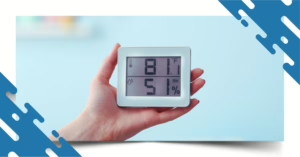

Have you ever wondered how to measure humidity at home when your house feels uncomfortable even though the thermostat is set to the right temperature?
Maybe your home feels sticky during the summer, your skin feels unusually dry, or you notice condensation on your windows. These can all be signs that your indoor humidity level is too high or too low.
Humidity affects more than comfort. Excess moisture can contribute to condensation, mold and mildew growth, and musty odors, while overly dry air can contribute to dry skin, irritated airways, static electricity, and damage to certain wood furnishings.
The good news is that checking humidity at home is simple. With an inexpensive hygrometer, smart thermostat, or whole-home humidity control system, you can monitor your indoor air and take steps to keep moisture levels under control.
What Is Indoor Humidity?
Indoor humidity refers to the amount of water vapor in the air inside your home. It is commonly measured as relative humidity (RH) and expressed as a percentage.
For example, a reading of 45% RH means the air contains approximately 45% of the moisture it could hold at that temperature.
Humidity naturally changes throughout the day. Showering, cooking, laundry, outdoor weather, air conditioning, heating, and ventilation can all affect your home’s humidity level.
That’s why taking a single measurement isn’t always enough. Monitoring humidity at different times and in different rooms can give you a much better understanding of your home’s indoor environment.
What Is the Ideal Humidity Level at Home?
For most homes, the EPA recommends keeping indoor relative humidity between 30% and 50%, while maintaining it below 60% to help control moisture and reduce conditions that encourage mold growth.
Indoor Humidity | What It May Mean |
| Below 30% | Air may feel excessively dry |
| 30%–50% | Generally recommended range |
| 50%–60% | Monitor closely, especially if condensation occurs |
| Above 60% | Excess moisture can increase the risk of condensation and mold growth |
Your home’s ideal humidity can vary somewhat depending on outdoor conditions, temperature, building characteristics, and HVAC operation. The goal is to maintain a comfortable level while avoiding excessive moisture.
Why Is Measuring Humidity at Home Important?
You can often tell when a home feels too hot or too cold, but humidity is harder to judge accurately.
A humidity meter for your home takes the guesswork out of indoor moisture control.
Keeping track of humidity can help you:
- Identify excessive moisture before it becomes a bigger problem
- Reduce condensation on windows and other surfaces
- Recognize conditions that may encourage mold and mildew
- Improve indoor comfort
- Protect wood floors, furniture, and other moisture-sensitive materials
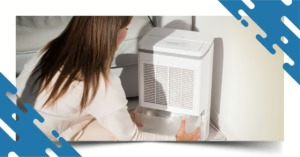
- Determine whether you may need a humidifier or dehumidifier
- Understand how well your HVAC system is controlling moisture
- Improve overall indoor air quality
The EPA notes that controlling moisture is an important part of controlling indoor mold.
Best Tools to Measure Humidity at Home
If you’re serious about improving your home’s comfort and protecting your indoor air quality, using the right humidity measuring device is the first step. Fortunately, you don’t need expensive equipment—many reliable options are affordable, accurate, and easy to use.
1. Hygrometer – Your Basic Humidity Tracker
If you’re looking for the simplest and most affordable way to monitor indoor humidity, a hygrometer is the perfect place to start.
It is like a thermometer—but instead of measuring temperature, it measures the amount of moisture in the air, also known as relative humidity. Most digital hygrometers display both temperature and humidity, giving you a quick snapshot of your home’s indoor environment.
Imagine waking up every morning wondering why your skin feels dry or why your bedroom feels damp. A hygrometer removes the guesswork by showing exactly what’s happening with your indoor air.
For the most accurate readings:
- Place it away from windows, doors, air vents, and direct sunlight.
- Check humidity at different times of the day to spot patterns.
- Use multiple hygrometers in larger homes to compare humidity levels between rooms.
If your readings consistently fall outside the recommended 30% to 50% indoor humidity range, it may be time to consider additional humidity control solutions.

2. Smart Thermostats with Built-In Humidity Sensors
If you already have a modern HVAC system, your thermostat may be doing more than simply controlling the temperature.
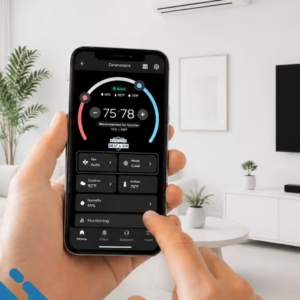
Many smart thermostats include built-in humidity sensors that continuously monitor indoor moisture levels while helping your heating and cooling system operate more efficiently. Instead of checking humidity manually, you can view real-time readings directly on the thermostat or through a smartphone app.
This is especially useful if you’ve noticed that certain seasons leave your home feeling overly humid or unusually dry.
A smart thermostat allows you to:
- Monitor indoor humidity anytime, anywhere.
- Adjust temperature and humidity settings remotely.
- Improve indoor comfort throughout the year.
- Reduce unnecessary energy usage.
- Receive alerts when humidity levels become too high or too low.
Some advanced models even work alongside whole-home humidifiers and dehumidifiers, automatically maintaining your desired humidity level with little to no effort.
3. Whole-Home Humidifiers and Dehumidifiers with Automatic Humidity Control
If you’re constantly battling dry air in winter or excessive humidity during the summer, measuring humidity is only part of the solution. The next step is controlling it automatically.
Whole-home humidifiers and dehumidifiers are installed directly into your HVAC system and work throughout your entire home—not just one room. Many include built-in humidity sensors that continuously monitor moisture levels and make automatic adjustments to keep your indoor air within the ideal range.
Imagine never having to worry about sticky rooms, musty odors, dry skin, static electricity, or condensation on your windows again. Instead of constantly checking humidity levels yourself, your HVAC system does the work for you.
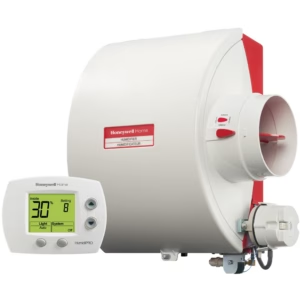
A whole-home humidity control system can help:
- Maintain the ideal indoor humidity year-round.
- Reduce the risk of mold and mildew growth.
- Improve indoor air quality.
- Protect hardwood floors, furniture, musical instruments, and electronics from moisture damage.
- Make your home feel more comfortable at lower thermostat settings, helping improve energy efficiency.
If your home’s humidity is consistently too high or too low—even after using portable humidifiers or dehumidifiers—it may be time to have an HVAC professional evaluate your system. Installing a whole-home humidity control solution offers a convenient, long-term way to improve comfort, protect your home, and create a healthier indoor environment for your family.
Step-by-Step Guide: How to Measure Humidity at Home Accurately
Step 1: Choose the Right Humidity Measuring Device
The first step in learning how to measure humidity at home is selecting the right tool.
A basic digital hygrometer is an affordable and reliable option for most homeowners. It displays your home’s relative humidity (RH) and temperature in real time, making it ideal for bedrooms, living rooms, or home offices.
If you prefer a smarter solution, consider a Wi-Fi-enabled humidity sensor or a smart thermostat with built-in humidity monitoring. These devices allow you to monitor indoor humidity remotely, receive alerts when levels become unhealthy, and even integrate with your HVAC system for automated comfort.
Best for:
- Digital hygrometers for everyday monitoring
- Smart sensors for larger homes or multiple rooms
- Smart thermostats for complete indoor climate control
Pro Tip: Use the same device consistently to ensure accurate long-term readings.
Step 2: Place Your Humidity Sensor in the Right Location
Even the best humidity meter can provide inaccurate readings if it’s placed in the wrong spot.
Avoid placing your hygrometer:
- Near windows or exterior doors
- In direct sunlight
- Next to HVAC vents
- Close to fireplaces, ovens, or space heaters
- Inside bathrooms during showers
Instead, position it in a central living area where your family spends the most time, about 3 to 5 feet above the floor.
If your home has multiple stories, finished basements, or rooms that feel noticeably different, place additional sensors throughout the house. This helps identify humidity imbalances that may indicate poor ventilation, insulation issues, or HVAC performance problems.
Step 3: Measure Humidity Throughout the Day
Indoor humidity isn’t constant—it changes as your daily activities and the weather change.
For example:
- Morning showers increase bathroom humidity.
- Cooking releases moisture into the air.
- Running the dryer can affect nearby rooms.
- Air conditioning reduces humidity during hot afternoons.
- Heating systems often dry the air during winter evenings.
Take readings at different times of the day—morning, afternoon, and evening—for several days. This gives you a more complete picture of your home’s humidity patterns rather than relying on a single measurement.
The more data you collect, the easier it becomes to identify recurring issues.
Step 4: Keep a Record of Your Humidity Levels
Tracking your readings over time helps you recognize seasonal trends and detect potential problems early.
Create a simple log that includes:
- Date
- Time
- Indoor humidity percentage
- Indoor temperature
- Outdoor weather conditions (optional)
After a few weeks, you’ll notice patterns such as:
- Low humidity whenever the furnace runs
- High humidity after rainy weather
- Certain rooms staying consistently damp
- Humidity spikes during cooking or laundry
These insights make it easier to decide whether your home needs a humidifier, dehumidifier, improved ventilation, or HVAC adjustments.
Step 5: Compare Your Readings to the Ideal Indoor Humidity Range
Knowing your humidity level only helps if you know what’s considered healthy.
Experts generally recommend maintaining indoor humidity between 40% and 60% relative humidity (RH).
| Below 40% humidity may cause: | Above 60% humidity may lead to: |
| Dry skin and itchy eyes | Mold and mildew growth |
| Nosebleeds | Musty odors |
| Static electricity | Dust mite infestations |
| Cracked wood furniture and flooring | Condensation on windows |
| Increased respiratory irritation | Reduced indoor comfort |
| Higher cooling costs |
Keeping humidity within the recommended range supports better indoor air quality, protects your home, and helps your HVAC system operate more efficiently.
Smart Tips for Managing Indoor Humidity
Now that you know how to measure humidity at home, the next step is maintaining healthy humidity levels throughout every season. The right solution depends on whether your home is too dry or too humid.
1. Add Moisture When the Air Is Too Dry
Have you ever noticed dry skin, frequent static shocks, or irritated sinuses during winter? Those are common signs of low indoor humidity.
To increase humidity naturally and safely:
- Use a portable or whole-home humidifier.
- Add moisture-loving houseplants like peace lilies, spider plants, or Boston ferns.
- Leave the bathroom door open after a hot shower to let steam circulate.
- Place bowls of water near heating vents.
- Cook more often using boiling or steaming methods.
These simple changes can make your home feel noticeably more comfortable while improving indoor air quality.
2. Reduce Excess Humidity Before It Causes Damage
If your home feels sticky even with the air conditioner running, excessive humidity could be the culprit.
High humidity doesn’t just make you uncomfortable—it creates the perfect environment for mold, mildew, bacteria, and dust mites.
Reduce excess moisture by:
- Running a dehumidifier in damp areas like basements.
- Using bathroom and kitchen exhaust fans every time you shower or cook.
- Improving airflow with ceiling fans.
- Repairing plumbing leaks and roof leaks promptly.
- Ensuring your HVAC system is properly sized and maintained.
Keeping excess moisture under control protects both your health and your home’s structure.
3. Adjust Your Humidity Strategy With the Seasons
Indoor humidity changes throughout the year, so your approach should too.
During summer:
- Run your air conditioner consistently.
- Use a dehumidifier if the humidity remains above 60%.
- Keep windows closed during hot, humid weather.
During winter:
- Add moisture with a humidifier.
- Reduce excessive heating when possible.
- Monitor humidity carefully to prevent overly dry indoor air.
Seasonal adjustments help maintain comfort while reducing unnecessary strain on your HVAC system.
4. Let Your Humidity Data Guide Your Decisions
Your humidity readings aren’t just numbers—they’re valuable insights into your home’s indoor environment.
Review your measurements regularly to answer questions like:
- Which rooms are consistently humid?
- When does humidity rise or fall?
- Is your HVAC system maintaining comfortable conditions?
- Do you need additional humidity control equipment?
Over time, these patterns help you make informed decisions that improve comfort, lower energy costs, and extend the life of your heating and cooling system.
Need Help Controlling Humidity in Your Home?
Frequently Asked Questions About Humidity at Home
The easiest method is to use a digital hygrometer or humidity meter. These inexpensive devices measure relative humidity and often display temperature as well. For more advanced monitoring, a smart thermostat or Wi-Fi humidity sensor can track conditions over time.
The EPA recommends keeping indoor relative humidity between 30% and 50%, while keeping it below 60% to help control moisture and reduce conditions favorable to mold growth.
Place a digital hygrometer in a central living area away from windows, direct sunlight, HVAC vents, and heat sources. Let the device stabilize and record the relative humidity percentage. Repeat measurements at different times and in different rooms for a more accurate picture.
60% RH is at the upper limit and is not an ideal target for most homes. The EPA recommends keeping indoor humidity between 30% and 50% and below 60% when possible.
Use your air conditioner, run bathroom and kitchen exhaust fans, address plumbing or roof leaks, improve ventilation when outdoor conditions allow, and consider a dehumidifier if humidity remains high.
Possible causes include an oversized air conditioner, restricted airflow, poor maintenance, drainage problems, excessive outdoor air infiltration, or a need for additional dehumidification.
If your home feels cool but still feels damp or sticky, check the indoor relative humidity with a hygrometer.
High humidity can create conditions that support mold growth. The EPA recommends controlling moisture and keeping indoor relative humidity below 60%, ideally between 30% and 50%.
Yes. During normal cooling operation, an air conditioner removes moisture from indoor air as part of the cooling process. However, the amount of moisture removed depends on factors such as system operation, equipment sizing, airflow, and indoor conditions.
Not necessarily. A properly operating central AC system can remove moisture while cooling. However, if indoor humidity remains consistently high, a dehumidifier may provide additional moisture control.
Place your sensor in a representative living area, approximately 3–5 feet above the floor, and away from direct sunlight, windows, doors, HVAC vents, kitchens, bathrooms, and other localized sources of heat or moisture.
If you’re troubleshooting a humidity problem, check it several times throughout the day for several days. Once your home’s humidity is stable, occasional monitoring can help you identify seasonal changes or developing problems.
Related Blog Posts
Read more articles and expert advice related to this service.