
If your central air conditioner struggles to start, makes a loud humming noise, or blows warm air, a failing AC capacitor could be one possible cause.
The AC capacitor is a small but essential electrical component that helps the compressor and fan motors start and operate properly. When it begins to weaken, your air conditioner may become less reliable, less efficient, or stop working altogether.
But there is an important safety warning: AC capacitors can store electrical energy even after the air conditioner has been turned off. Testing, discharging, or replacing one incorrectly can result in serious electrical injury.
In this guide, we’ll explain what an AC capacitor does, the warning signs of capacitor failure, how HVAC professionals test capacitors, and when it’s time to call an expert.
If you’re having AC problems in Ocala or surrounding areas, Iron Shield Heating & Air can safely diagnose and repair your air conditioning system.
What is an AC Capacitor?

An AC capacitor is an electrical component that stores and releases energy to help your air conditioner’s motors start and continue running efficiently.
Think of it as a temporary electrical energy reserve. When your thermostat calls for cooling, the capacitor provides the electrical boost needed by the compressor and/or fan motor. It then helps maintain the electrical conditions needed for the motor to operate properly.
A capacitor may be located inside the outdoor condenser unit or, depending on the system design, in another part of the HVAC system.
Common Types of AC Capacitors
There are three common capacitor configurations found in residential HVAC systems:
Start Capacitor
Provides a strong, temporary electrical boost to help a motor start.
Run Capacitor
Remains in the circuit while the motor operates and helps it run efficiently.
Dual Run Capacitor
Combines two capacitor functions into one component. Many residential central air conditioners use dual run capacitors to support both the compressor and condenser fan motor.
What Does an AC Capacitor Do?
Your AC capacitor plays an important role in the cooling cycle.
Depending on the system, it can help:
- Start the compressor motor
- Start the outdoor condenser fan motor
- Keep motors operating properly
- Support stable motor performance
- Help the air conditioner operate efficiently
When a capacitor becomes weak or fails, the affected motor may struggle to start or operate correctly. This can contribute to poor cooling, unusual noises, short cycling, or an AC system that won’t start.
Signs of a Bad AC Capacitor
A bad AC capacitor doesn’t always fail without warning. Your air conditioner may show several symptoms before the capacitor stops working completely.
Watch for these common signs:
1. Your AC Won't Start
If your thermostat is calling for cooling but the outdoor unit won’t start, a failed capacitor is one possible cause. However, other electrical, thermostat, motor, or refrigerant problems can produce similar symptoms.
2. The Outdoor Unit Hums but the Fan Isn't Spinning
A loud humming sound from the outdoor unit while the fan isn’t turning can be a sign that the motor is trying to start but isn’t receiving the electrical assistance it needs.
A failed run capacitor is one possible cause.
3. Your AC Blows Warm Air
If your air conditioner is running but isn’t cooling properly, a weak capacitor could be contributing to the problem.
However, warm air can also be caused by refrigerant issues, airflow restrictions, dirty coils, compressor problems, and other HVAC failures. A professional diagnosis is the best way to identify the actual cause.
4. The AC Starts Slowly
A noticeable delay, struggling startup, or unusual sound when your AC turns on can indicate an electrical or motor-related problem, including a capacitor that is no longer performing properly.
5. Your AC Is Short Cycling
Short cycling occurs when your air conditioner repeatedly starts and stops without completing a normal cooling cycle.
A failing capacitor can contribute to this problem, although other issues can also cause short cycling.
6. The Capacitor Looks Swollen or Damaged
During a professional inspection, technicians may look for:
- A bulging or swollen top
- Oil or fluid leakage
- Burn marks
- Corrosion
- Damaged terminals
- Other visible physical deterioration
Physical damage is a strong reason to have the capacitor professionally evaluated.
Safety First: Preparing to Check Your AC Capacitor
- Turn Off the Power. Switch off your AC at the thermostat and then turn off the breaker that powers your outdoor unit. Double-check that the unit is completely off before moving forward.
- Protect Yourself with Gear. Safety glasses and insulated gloves are a must. Even a discharged capacitor can have residual energy, so protection is essential.
- Use Insulated Tools. Only use tools with insulated handles to avoid accidental electrical contact.
- Discharge the Capacitor Safely. Capacitors can hold a charge longer than you’d expect. Use a proper resistor or an insulated screwdriver, and never touch the terminals with your bare hands.
- Work in a Dry Environment. Moisture and electricity don’t mix. Make sure the space around your AC unit is dry before starting.
Step-by-Step Guide to Checking Your AC Capacitor
Checking your AC capacitor can feel a bit intimidating at first, but understanding each step and taking your time can make the process much more manageable and safe. Even if you’re comfortable with basic DIY tasks, capacitors hold electrical energy, so it’s important to approach this carefully. If you ever feel unsure, don’t hesitate to pause and reach out to a professional—safety always comes first.
Here’s a simple, step-by-step approach:
1. Locate the Capacitor
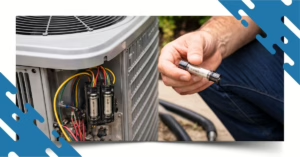
Start by locating the capacitor inside your outdoor AC unit. Most capacitors are small, cylindrical, or oval-shaped devices usually mounted near the compressor or fan motor. Many modern units feature a dual capacitor, which combines both the start and run functions into a single component. If you need extra guidance on identifying your AC capacitor, you can follow this detailed guide on how to check an AC capacitor. Before touching anything, take a moment to visually familiarize yourself with its terminals and overall shape. Recognizing the capacitor before you begin will make the following steps easier and safer.
2. Inspect Visually
Next, carefully inspect the capacitor. Carefully inspect the casing for any signs of damage or wear. Common indicators of a failing capacitor include bulging or swollen sides, leaking fluid, burn marks, or corrosion on the terminals. Even minor damage can affect performance, and if you notice any of these signs, it’s often better to replace the capacitor rather than attempt repairs. A visual inspection alone can save you from more extensive problems down the line.
3. Discharge the Capacitor Safely
Once you’ve assessed the capacitor’s exterior, the next step is to safely discharge any stored electrical energy. Capacitors can retain a charge long after your AC unit has been turned off, and touching the terminals without discharging them first can result in a serious shock. Using a proper resistor or an insulated screwdriver, carefully bridge the terminals to release the stored energy. Take your time with this step—rushing increases the risk of injury.
4. Test the Capacitor with a Multimeter
After the capacitor is safely discharged, it’s time to test it with a multimeter. Set your multimeter to measure capacitance and carefully connect the probes to the capacitor’s terminals. Compare the measured value to the specifications printed on the capacitor itself. A reading that is significantly lower or higher than the listed capacitance indicates the capacitor is failing or already faulty. At this stage, it’s important not to try to “fix” the capacitor; replacement is the safest and most reliable solution.
5.Evaluate and Decide Next Steps
Take a moment to assess your findings. Even if the capacitor appears to be working correctly, testing and inspection are crucial for identifying early signs of wear before they lead to major AC problems. Regular professional maintenance is also recommended, as trained technicians can identify subtle issues that might be missed during a DIY check.
AC Capacitor FAQs
Common signs include a humming outdoor unit, difficulty starting, warm air, short cycling, or visible swelling or leakage on the capacitor. However, these symptoms can also be caused by other HVAC problems, so professional testing is recommended.
A meter with capacitance-testing capability can be used to measure a capacitor, but accessing and testing an HVAC capacitor involves electrical hazards. Because capacitors can retain stored electrical energy, homeowners should have capacitor testing performed by a qualified HVAC professional.
Because an AC capacitor can store electrical energy even after power is disconnected, capacitor discharge should be performed using appropriate electrical safety procedures and equipment by a qualified technician. Improper discharge can result in serious injury.
The total cost varies based on the capacitor, equipment, labor, accessibility, and local service rates. Current published industry guidance from Carrier places typical professional replacement costs in a broad range of approximately $100–$400, but your actual price may differ.
A failing capacitor can cause the compressor motor to struggle to start or operate correctly, potentially placing additional stress on the system. Prompt diagnosis can help prevent a small electrical problem from becoming a more expensive repair.
A humming outdoor unit can indicate that a motor is attempting to start but is having difficulty doing so. A failed capacitor is one possible cause, but a technician should also check other electrical and mechanical components.
DIY AC capacitor replacement is not recommended. Capacitors can retain high-voltage electrical energy even when the system is turned off. Professional HVAC technicians have the proper tools and training to safely diagnose and replace these components.
Regular AC maintenance and tune-ups can help identify capacitor wear, electrical problems, dirty components, and other issues before they result in a major breakdown. Keeping the outdoor unit clear and maintaining proper airflow can also help your system operate under less strain.
Call for Help if Needed
Related Blog Posts
Read more articles and expert advice related to this service.